> For the complete documentation index, see [llms.txt](https://en-api.decisiontele.com/llms.txt). Markdown versions of documentation pages are available by appending `.md` to page URLs; this page is available as [Markdown](https://en-api.decisiontele.com/viber-bot-api.md).
# Viber Bot API
Decision Telecom Viber Bot API allows you to send and receive Viber Bot messages via API.
To implement the API, you will need the following:
1. **An Active Viber account** on a platform that supports bots (iOS/Android). This account will be set as the account administrator after the account creation process.
2. **Active bot** — since 5.02.24, Viber bots can only be created on commercial terms. Please contact our manager **to receive the Viber Bot activation form.**
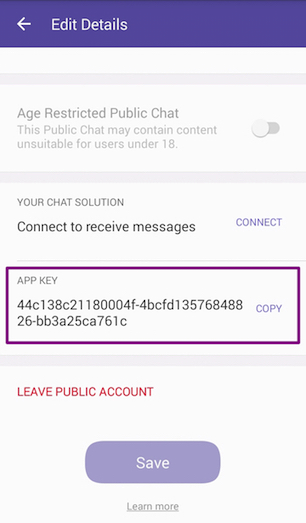
3. **Account authentication token** - unique account identifier used to validate your account in all API requests. Each request posted to Rakuten Viber by the account will need to contain the token. When your bot is created, you will be added as an admin and the token will appear in your Viber account settings (More > Settings > Bots > Edit Info > Your app key)
4. **Set-up account webhook** — this needs to be done once during the account setup process to define your webhook and the type of responses you would like to receive.
**Supported platforms**
Bots are currently supported on iOS and Android devices running Viber version 6.5 and above and on desktop from version 6.5.3.
## API Authorization
The Viber Bot API uses HTTPS with access key that is used as the API authorization. Request and response payloads are formatted as JSON using UTF-8 encoding.
Please contact your Decision Telecom account manager to **get an Base64 access API key**.
## Viber Bot Authorization
The authentication token (also known as application key) is a unique and secret account identifier. Each API request must include an HTTP Header called X-Viber-Auth-Token containing the account’s authentication token.
**Example**:
```
$userHashKey = 'User Hash Key provided by your account manager';
$ch = curl_init('https://web.it-decision.com/v2/api/viber-bot-set-webhook');
curl_setopt($ch, CURLOPT_RETURNTRANSFER,1);
curl_setopt($ch, CURLOPT_HTTPAUTH, CURLAUTH_BASIC);
curl_setopt($ch, CURLOPT_USERPWD, "$userHashKey");
curl_setopt($ch, CURLOPT_TIMEOUT, 30);
curl_setopt($ch, CURLOPT_POST, 1);
curl_setopt($ch, CURLOPT_POSTFIELDS, json_encode($requestParams)); // $requestParams - raquest array with correct data
curl_setopt($ch, CURLOPT_HTTPHEADER,
array(
'X-Viber-Auth-Token: 445da6az1s345z78-dazcczb2542zv51a-e0vc5fva17480im9',
'Content-Type: application/json'
)
);
$result = curl_exec($ch);
curl_close($ch);
```
The authentication token is generated upon bot creation and can be viewed by the account’s admins in the “edit info” screen of their bot or on the Viber Admin Panel.
**Note:** Failing to send the authentication token in the header will result in an error.
## Webhooks
Once you have your token you will be able to set your account’s webhook. This webhook will be used for receiving callbacks and user messages from Viber.
Setting the webhook will be done by calling the `set_webhook` API with a valid & certified URL. This action defines the account’s webhook and the type of events the account wants to be notified about.
For security reasons only URLs with valid and official SSL certificate from a trusted CA will be allowed. The certificate CA should be on the Sun Java trusted root certificates list.
Once a `set_webhook` request is sent Viber will send a callback to the webhook to check its availability and return a response to the user. The check succeeds if the Viber server receives HTTP status 200 in response to the callback, but fails if it recieves any other status. If your set\_webhook response doesn’t have `"status":0`, please verify that all requests to your webhook URL receive HTTP status 200 in response.
Note that once you set your webhook the 1-on-1 conversation with your account will become available. To disable 1-on-1 conversation with your account you’ll need to remove your webhook – see [removing your webhook](#removing-your-webhook) below.
Viber’s API allows you to receive user names and photos. This has been updated to comply with privacy laws and allow developers who don’t make use of user names and photos as part of their service to opt out. If you don’t use user names photos, please opt-out to default values.
To set the request, pass `send_name` and `send_photo` flags with the `set_webhook` request.
**Note:** This feature will work if the user has allowed “Content Personalisation” (More → Privacy → personal data). If the user has disallowed content personalization, you will receive placeholder values.
### Setting a Webhook
**Resource URL**
```html
https://web.it-decision.com/v2/api/viber-bot-set-webhook
```
**Post data**
```json
{
"url":"https://my.host.com",
"event_types":[
"delivered",
"seen",
"failed",
"subscribed",
"unsubscribed",
"conversation_started"
],
"send_name":true,
"send_photo":true
}
```
**Post parameters**
| Name | Description | Validation |
| ------------ | ------------------------------------------------------------------------------------------------------------------------------------------------------------------------ | ------------------------------------------------------------------------------------------------------------------- |
| url | required. Account webhook URL to receive callbacks & messages from users | Webhook URL must use SSL Note: Viber doesn’t support self signed certificates |
| event\_types | optional. Indicates the types of Viber events that the account owner would like to be notified about. **Don’t include this parameter in your request to get all events** | Possible values: `delivered`, `seen`, `failed`, `subscribed`, `unsubscribed` , `conversation_started` and `message` |
| send\_name | optional. Indicates whether or not the bot should receive the user name. Default `true` | Possible values: `true`, `false` |
| send\_photo | optional. Indicates whether or not the bot should receive the user photo. Default `true` | Possible values: `true`, `false` |
**Set webhook Response**
```json
{
"status":0,
"status_message":"ok",
"event_types":[
"subscribed",
"unsubscribed",
"conversation_started",
"delivered",
"failed",
"message",
"seen"
]
}
```
**Response parameters**
| Name | Description | Possible values |
| --------------- | ------------------------------------------------------------------------------------------------------ | ------------------------------------------------------------------------------------------------------------------------------------------------------------------------------------------------------------------------------------------------------------------------------------------- |
| status | Action result | `0` for success. In case of failure – appropriate failure status number. See [error codes](#error-codes) table for additional information |
| status\_message | `ok` or failure reason |
Success: ok. Failure: invalidAuthToken, badData, missingData and failure. See error codes table for additional information. Http code 404: Requesting an invalid URL.
|
| event\_types | List of event types you will receive a callback for. Should return the same values sent in the request | `delivered`, `seen`, `failed`, `subscribed`, `unsubscribed` , `conversation_started` and `message` |
**Event types filtering**
The `event_types` parameter allows accounts to choose which events they would get a callback for.\
The following events are mandatory and can’t be filtered out: `message`, `subscribed` and `unsubscribed`.\
The following events can be filtered out during the `set_webhook` request: `delivered`, `seen`, `failed` and `conversation_started`.\
Sending a `set_webhook` request with no event\_types parameter means getting **all** events.\
Sending a `set_webhook` request with empty `event_types` list `("event_types": [])` means getting **only mandatory** events. See [callbacks](#callbacks) section for full callbacks events information.
**Set webhook callback**
For each `set_webhook` request Viber will send a callback to the webhook URL to confirm it is available. The expected HTTP response to the callback is `200` OK – any other response will mean the webhook is not available. If the webhook is not available the `set_webhook` response sent to the user will be status 1: invalidUrl.
**Callback data**
```json
{
"event":"webhook",
"timestamp":1457764197627,
"message_token":241256543215
}
```
**Callback parameters**
| Name | Description | Possible values |
| -------------- | -------------------------------------------------- | --------------- |
| event | Callback type – which event triggered the callback | webhook |
| timestamp | Time of the event that triggered the callback | Epoch time |
| message\_token | Unique ID of the message | |
#### Removing your webhook
Once you set a webhook to your bot your 1-on-1 conversation button will appear and users will be able to access it.\
At the moment there is no option to disable the 1-on-1 conversation from the bot settings, so to disable this option you’ll need to remove the webhook you set for the account. Removing the webhook is done by Posting a `set_webhook` request with an empty webhook string.
**Resource URL**
```html
https://web.it-decision.com/v2/api/viber-bot-set-webhook
```
**Post data**
```json
{
"url":""
}
```
**Post parameters**
| Name | Description |
| ---- | ------------------------------------------------------------------------------------------------------------------------------------------------ |
| url | required. Account webhook URL to receive callbacks & messages from users. In this case, use an empty string to remove any previously set webhook |
## Send Message
The `send_message` API allows accounts to send messages to Viber users who subscribe to the account. Sending a message to a user will be possible only after the user has subscribed to the bot. (see `subscribed` [callback](#subscribed) for additional information). You can share your bot with the users via a [deeplink](https://developers.viber.com/docs/tools/deep-links/).
The API supports a variety of message types: `text`, `picture`, `video`, `file`, `location`, `sticker`, `contact`, `carousel content` and `URL`. Specific post data examples and required parameters for each message type are given below.
**Validation**
Maximum total JSON size of the request is 10kb.
**Resource URL**
```html
https://web.it-decision.com/v2/api/viber-bot-send-message
```
#### General send message parameters
The following parameters are available for all message types:
| Name | Description | Validation |
| ----------------- | ------------------------------------------------------------------------------------------------------------------------ | ----------------------------------------------------------------------------------------------------------------------------------------------- |
| receiver | Unique Viber user id | required, subscribed valid user id |
| type | Message type | required. Available message types: `text`, `picture`, `video`, `file`, `location`, `contact`, `sticker`, `carousel content` and `url` |
| sender.name | The sender’s name to display | required. Max 28 characters |
| sender.avatar | The sender’s avatar URL | optional. Avatar size should be no more than 100 kb. Recommended 720x720 |
| tracking\_data | Allow the account to track messages and user’s replies. Sent `tracking_data` value will be passed back with user’s reply | optional. max 4096 characters |
| min\_api\_version | Minimal API version required by clients for this message (default 1) | optional. client version support the API version. Certain features may not work as expected if set to a number that’s below their requirements. |
#### Response
**Response parameters**
| Name | Description | Possible values |
| ----------- | ------------------------ | --------------- |
| message\_id | Unique ID of the message | |
**Response example:**
```json
{
"message_id":4291235
}
```
**Callback parameters**
| Name | Description | Possible values |
| --------------- | -------------------------------------------------------------------------------------------------------------------- | ------------------------------------------------------------------------------------------------------------------------------------------------------------------------------------------------------------------------------------------------------------------------------------------- |
| status | Action result | `0` for success. In case of failure - appropriate failure status number. See [error codes](#error-codes) table for additional information |
| status\_message | `ok` or failure reason |
Success: ok. Failure: invalidAuthToken, badData, missingData and failure. See error codes table for additional information. Http code 404: Requesting an invalid URL.
|
| message\_id | Unique ID of the message | |
| message\_token | Unique ID of the message received from Viber | |
| chat\_hostname | Internal use | |
| billing\_status | An indication of how this message is categorized for billing purposes, allowing you to know if it was charged or not | An integer between 0 and 5. See below an explanation for all possible values. |
Below you can find the possible values for the billing\_status parameter:
| Value | Description |
| ----- | -------------------------------------------------------------------------------------------------------- |
| `0` | Default for all cases other than the ones listed below: chat extension, reply to open conversation, etc. |
| `1` | 1:1 message/keyboard sent in a session |
| `2` | 1:1 message/keyboard sent in a session |
| `3` | Free out of session 1:1 message/keyboard |
| `4` | Free out of session 1:1 message/keyboard |
| `5` | Charged out of session 1:1 message/keyboard |
**Callback example:**
```json
{
"status":0,
"status_message":"ok",
"message_token":5741311803571721087,
"chat_hostname":"SN-CHAT-05_",
"billing_status":1
}
```
#### Message types
Below is a list of all supported message types with post data examples.
**Text message**
**Post data**
```json
{
"receiver":"01234567890A=",
"min_api_version":1,
"sender":{
"name":"John McClane",
"avatar":"https://avatar.example.com"
},
"tracking_data":"tracking data",
"type":"text",
"text":"Hello world!"
}
```
**Post parameters**
| Name | Description | Validation |
| ---- | ----------------------- | ----------------------------------------------------------------------------------------------------- |
| type | Message type | required. `text`. Supports [text formatting](https://developers.viber.com/docs/tools/text-formatting) |
| text | The text of the message | required. Max length 7,000 characters |
**Picture message**
**Post data**
```json
{
"receiver":"01234567890A=",
"min_api_version":1,
"sender":{
"name":"John McClane",
"avatar":"https://avatar.example.com"
},
"tracking_data":"tracking data",
"type":"picture",
"text":"Photo description",
"media":"https://www.images.com/img.jpg",
"thumbnail":"https://www.images.com/thumb.jpg"
}
```
**Post parameters**
| Name | Description | Validation |
| --------- | -------------------------------------------------------------- | ---------------------------------------------------------------------------------------------------------------------------------------------------------------------------------------------------------------------------------------------------------------------------------------------- |
| type | Message type | required. `picture` |
| text | Description of the photo. Can be an empty string if irrelevant | required. Max 768 characters |
| media | URL of the image (JPEG, PNG, non-animated GIF) | required. The URL must have a resource with a `.jpeg`, `.png` or `.gif` file extension as the last path segment. Example: `https://www.example.com/path/image.jpeg`. Max image size: 1MB on iOS, 3MB on Android. **Note** GIFs are only static. To send animated GIFs please check URL message |
| thumbnail | URL of a reduced size image (JPEG, PNG, GIF) | optional. Recommended: 400x400. Max size: 100kb. |
**Video message**
**Post data**
```json
{
"receiver":"01234567890A=",
"min_api_version":1,
"sender":{
"name":"John McClane",
"avatar":"https://avatar.example.com"
},
"tracking_data":"tracking data",
"type":"video",
"media":"https://www.images.com/video.mp4",
"thumbnail":"https://www.images.com/thumb.jpg",
"size":10000,
"duration":10
}
```
**Post parameters**
| Name | Description | Validation |
| --------- | ------------------------------------------------------------ | ------------------------------------------------------------------------------------------------------------------------------------------------------------------------------------------------ |
| type | Message type | required. `video` |
| media | URL of the video (MP4, H264) | required. Max size 26 MB. Only MP4 and H264 are supported. The URL must have a resource with a `.mp4` file extension as the last path segment. Example: `https://www.example.com/path/video.mp4` |
| size | Size of the video in bytes | required |
| duration | Video duration in seconds; will be displayed to the receiver | optional. Max 180 seconds |
| thumbnail | URL of a reduced size image (JPEG) | optional. Max size 100 kb. Recommended: 400x400. Only JPEG format is supported |
**File message**
**Post data**
```json
{
"receiver":"01234567890A=",
"min_api_version":1,
"sender":{
"name":"John McClane",
"avatar":"https://avatar.example.com"
},
"tracking_data":"tracking data",
"type":"file",
"media":"https://www.images.com/file.doc",
"size":10000,
"file_name":"name_of_file.doc"
}
```
**Post parameters**
| Name | Description | Validation |
| ---------- | ------------------------- | -------------------------------------------------------------------------------------------------------------------------------------------------------------------------------------------------------------- |
| type | Message type | required. `file` |
| media | URL of the file | required. Max size 50 MB. URL should include the file extension. See [forbidden file formats](#forbidden-file-formats) for unsupported file types |
| size | Size of the file in bytes | required |
| file\_name | Name of the file | required. File name should include extension. Max 256 characters (including file extension). Sending a file without extension or with the wrong extension might cause the client to be unable to open the file |
**Contact message**
**Post data**
```json
{
"receiver":"01234567890A=",
"min_api_version":1,
"sender":{
"name":"John McClane",
"avatar":"https://avatar.example.com"
},
"tracking_data":"tracking data",
"type":"contact",
"contact":{
"name":"Itamar",
"phone_number":"+972511123123"
}
}
```
**Post parameters**
| Name | Description | Validation |
| --------------------- | --------------------------- | --------------------------- |
| type | Message type | required. `contact` |
| contact.name | Name of the contact | required. Max 28 characters |
| contact.phone\_number | Phone number of the contact | required. Max 18 characters |
**Location message**
**Post data**
```json
{
"receiver":"01234567890A=",
"min_api_version":1,
"sender":{
"name":"John McClane",
"avatar":"https://avatar.example.com"
},
"tracking_data":"tracking data",
"type":"location",
"location":{
"lat":"37.7898",
"lon":"-122.3942"
}
}
```
**Post parameters**
| Name | Description | Validation |
| -------- | -------------------- | ----------------------------------------------------------------- |
| type | Message type | required. `location` |
| location | Location coordinates | required. latitude (±90°) & longitude (±180°) within valid ranges |
**URL message**
**Post data**
```json
{
"receiver":"01234567890A=",
"min_api_version":1,
"sender":{
"name":"John McClane",
"avatar":"https://avatar.example.com"
},
"tracking_data":"tracking data",
"type":"url",
"media":"https://www.website.com/go_here"
}
```
**Post parameters**
| Name | Description | Validation |
| ----- | ------------ | ------------------------------ |
| type | Message type | required. `url` |
| media | URL, GIF | required. Max 2,000 characters |
**Sticker message**
**Post data**
```json
{
"receiver":"01234567890A=",
"min_api_version":1,
"sender":{
"name":"John McClane",
"avatar":"https://avatar.example.com"
},
"tracking_data":"tracking data",
"type":"sticker",
"sticker_id":46105
}
```
**Post parameters**
| Name | Description | Validation |
| ----------- | ----------------------------------------------------------------------------------------------------------------------- | ------------------- |
| type | Message type | required. `sticker` |
| sticker\_id | Unique Viber sticker ID. For examples visit the [sticker IDs](https://developers.viber.com/docs/tools/sticker-ids) page | |
**Rich Media message / Carousel content message**
The Rich Media message type allows sending messages with pre-defined layout, including height (rows number), width (columns number), text, images and buttons.
Below you will find an exmaple of a Carousel Content Message, that allows a user to scroll through a list of items, each composed of an image, description and call to action button.
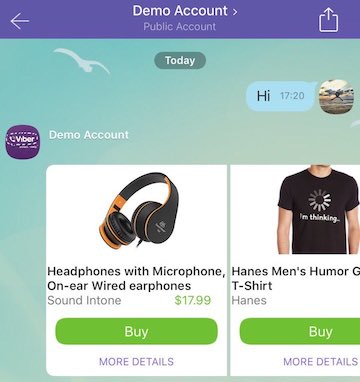
Each item on the list shown to the user is a button in the Rich Media message’s “Buttons” array. Sending one button is also permitted.
The parameters for Rich Media message and its buttons are also used for Keyboards. You can find additional information on them in [the following article](https://developers.viber.com/docs/tools/keyboards/).
**Notes:**
1. Carousel Content Message is supported on devices running Viber version 6.7 and above.
2. Each button is limited to a maximum of 7 rows.
3. Forwarding is not supported for Rich Media messages.
4. ActionTypes `location-picker` and `share-phone` are not supported for Rich Media messages.
**Post data**
```json
{
"receiver":"nsId6t9MWy3mq09RAeXiug==",
"type":"rich_media",
"min_api_version":7,
"rich_media":{
"Type":"rich_media",
"ButtonsGroupColumns":6,
"ButtonsGroupRows":7,
"BgColor":"#FFFFFF",
"Buttons":[
{
"Columns":6,
"Rows":3,
"ActionType":"open-url",
"ActionBody":"https://www.google.com",
"Image":"https://html-test:8080/myweb/guy/assets/imageRMsmall2.png"
},
{
"Columns":6,
"Rows":2,
"Text":"Headphones with Microphone, On-ear Wired earphones Sound Intone $17.99",
"ActionType":"open-url",
"ActionBody":"https://www.google.com",
"TextSize":"medium",
"TextVAlign":"middle",
"TextHAlign":"left"
},
{
"Columns":6,
"Rows":1,
"ActionType":"reply",
"ActionBody":"https://www.google.com",
"Text":"Buy",
"TextSize":"large",
"TextVAlign":"middle",
"TextHAlign":"middle",
"Image":"https://s14.postimg.org/4mmt4rw1t/Button.png"
},
{
"Columns":6,
"Rows":1,
"ActionType":"reply",
"ActionBody":"https://www.google.com",
"Text":"MORE DETAILS",
"TextSize":"small",
"TextVAlign":"middle",
"TextHAlign":"middle"
},
{
"Columns":6,
"Rows":3,
"ActionType":"open-url",
"ActionBody":"https://www.google.com",
"Image":"https://s16.postimg.org/wi8jx20wl/image_RMsmall2.png"
},
{
"Columns":6,
"Rows":2,
"Text":"Hanes Men's Humor Graphic T-Shirt Hanes$10.99",
"ActionType":"open-url",
"ActionBody":"https://www.google.com",
"TextSize":"medium",
"TextVAlign":"middle",
"TextHAlign":"left"
},
{
"Columns":6,
"Rows":1,
"ActionType":"reply",
"ActionBody":"https://www.google.com",
"Text":"Buy",
"TextSize":"large",
"TextVAlign":"middle",
"TextHAlign":"middle",
"Image":"https://s14.postimg.org/4mmt4rw1t/Button.png"
},
{
"Columns":6,
"Rows":1,
"ActionType":"reply",
"ActionBody":"https://www.google.com",
"Text":"MORE DETAILS",
"TextSize":"small",
"TextVAlign":"middle",
"TextHAlign":"middle"
}
]
}
}
```
**Post parameters**
| Name | Description | Possible values |
| ------------------------------- | --------------------------------------------------------------- | --------------------------------------------------- |
| alt\_text | Backward compatibility text | |
| rich\_media.ButtonsGroupColumns | Number of columns per carousel content block. Default 6 columns | 1 - 6 |
| rich\_media.ButtonsGroupRows | Number of rows per carousel content block. Default 7 rows | 1 - 7 |
| rich\_media.Buttons | Array of buttons | Max of 6 \* ButtonsGroupColumns \* ButtonsGroupRows |
**Button element**
| Name | Description | Possible values |
| ------- | ----------------------------------------------- | ---------------------- |
| Columns | Button column span. Default ButtonsGroupColumns | 1..ButtonsGroupColumns |
| Rows | Button row span. Default ButtonsGroupRows | 1..ButtonsGroupRows |
### Keyboards
The Viber API allows sending a custom keyboard using the `send_message` API, to supply the user with a set of predefined replies or actions. The keyboard can be attached to any message type or sent on it’s on. Once received, the keyboard will appear to the user instead of the device’s native keyboard. The keyboards are fully customizable and can be created and designed specifically for the account’s needs. The client will always display the last keyboard that was sent to it.
Read [the following article](https://developers.viber.com/docs/tools/keyboards/) to learn more about keyboards.
**Validation**
Maximum total JSON size of the request is 10kb.
#### Resource URL
```html
https://web.it-decision.com/v2/api/viber-bot-send-message
```
#### Post data
Keyboards can be attached to any message type and be sent and displayed together. To attach a keyboard to a message simply add the keyboard’s parameters to the message JSON.\
The example below shows a keyboard sent with a text message (note that the keyboard doesn’t contain all optional values).
```json
{
"receiver":"01234567890A=",
"min_api_version":7,
"type":"text",
"text":"Hello world",
"keyboard":{
"Type":"keyboard",
"DefaultHeight":false,
"Buttons":[
{
"ActionType":"reply",
"ActionBody":"reply to me",
"Text":"Key text",
"TextSize":"regular"
}
]
}
}
```
### Get Account Info
The `get_account_info` request will fetch the account’s details as registered in Viber. The account admin will be able to edit most of these details from his Viber client.
#### Resource URL
```html
https://web.it-decision.com/v2/api/viber-bot-get-account-info
```
#### Post data
```json
{
}
```
#### Response
```json
{
"status":0,
"status_message":"ok",
"id":"pa:75346594275468546724",
"name":"account name",
"uri":"accountUri",
"icon":"https://example.com",
"background":"https://example.com",
"category":"category",
"subcategory":"sub category",
"location":{
"lon":0.1,
"lat":0.2
},
"country":"UK",
"webhook":"https://my.site.com",
"event_types":[
"delivered",
"seen"
],
"subscribers_count":35,
"members":[
{
"id":"01234567890A=",
"name":"my name",
"avatar":"https://example.com",
"role":"admin"
}
]
}
```
**Response parameters**
| Name | Description | Possible values |
| ------------------ | ------------------------------------------------------------------------- | ------------------------------------------------------------------------------------------------------------------------------------------------------------------------------------------------------------------------------------------------------------------------------------------- |
| status | Action result | `0` for success. In case of failure – appropriate failure status number. See [error codes](#error-codes) table for additional information |
| status\_message | `ok` or failure reason |
Success: ok. Failure: invalidAuthToken, badData, missingData and failure. See error codes table for additional information. Http code 404: Requesting an invalid URL.
|
| id | Unique numeric id of the account | |
| name | Account name | Max 75 characters |
| uri | Unique URI of the Account | |
| icon | Account icon URL | JPEG, 720x720, size no more than 512 kb |
| background | Conversation background URL | JPEG, max 1920x1920, size no more than 512 kb |
| category | Account category | |
| subcategory | Account sub-category | |
| location | Account location (coordinates). Will be used for finding accounts near me | lat & lon coordinates |
| country | Account country | 2 letters country code - ISO ALPHA-2 Code |
| webhook | Account registered webhook | webhook URL |
| event\_types | Account registered events – as set by `set_webhook` request | `delivered`, `seen`, `failed` and `conversation_started` |
| subscribers\_count | Number of subscribers | |
| members | Members of the bot’s public chat | `id`, `name`, `avatar`, `role` for each Public Chat member (admin/participant). Deprecated. |
### Get User Details
The `get_user_details` request will fetch the details of a specific Viber user based on his unique user ID. The user ID can be obtained from the callbacks sent to the account regarding user’s actions. This request can be sent twice during a 12 hours period for each user ID.
#### Resource URL
```html
https://web.it-decision.com/v2/api/viber-bot-get-user-details
```
#### Post data
```json
{
"id":"01234567890A="
}
```
**Post parameters**
| Name | Description | Validation |
| ---- | -------------------- | ---------------------------------- |
| id | Unique Viber user id | required. subscribed valid user id |
#### Response
```json
{
"status":0,
"status_message":"ok",
"message_token":4912661846655238145,
"user":{
"id":"01234567890A=",
"name":"John McClane",
"avatar":"https://avatar.example.com",
"country":"UK",
"language":"en",
"primary_device_os":"android 7.1",
"api_version":1,
"viber_version":"6.5.0",
"mcc":1,
"mnc":1,
"device_type":"iPhone9,4"
}
}
```
**Response parameters**
| Name | Description | Possible values |
| ------------------------ | ------------------------------------------------------------------- | ---------------------------------------------------------------------------------------------------------------------------------------------------------------------------------------------------------------------------------------------------------------------------------------------------------------------------------- |
| status | Action result | `0` for success. In case of failure – appropriate failure status number. See [error codes](#error-codes) table for additional information |
| status\_message | `ok` or failure reason |
Success: ok. Failure: invalidAuthToken, badData, receiverNoSuitableDevice, missingData and failure. See error codes table for additional information. Http code 404: Requesting an invalid URL.
|
| message\_token | Unique id of the message | |
| user.id | Unique Viber user id | |
| user.name | User’s Viber name | |
| user.avatar | URL of the user’s avatar | |
| user.country | User’s country code | 2 letters country code - ISO ALPHA-2 Code |
| user.language | The language set in the user’s Viber settings. | ISO 639-1 |
| user.primary\_device\_os | The operating system type and version of the user’s primary device. | |
| user.api\_version | Max API version, matching the most updated user’s device | Currently only 1. Additional versions will be added in the future |
| user.viber\_version | The Viber version installed on the user’s primary device | |
| user.mcc | Mobile country code | |
| user.mnc | Mobile network code | |
| user.device\_type | The user’s device type | |
### Get Online
The `get_online` request will fetch the online status of a given subscribed account members. The API supports up to 100 user id per request and those users must be subscribed to the account.
#### Resource URL
```html
https://web.it-decision.com/v2/api/viber-bot-get-online
```
#### Post data
```json
{
"ids":[
"01234567890=",
"01234567891=",
"01234567893="
]
}
```
**Post parameters**
| Name | Description | Validation |
| ---- | -------------------- | ----------------------------- |
| ids | Unique Viber user id | required. 100 ids per request |
#### Response
```json
{
"status":0,
"status_message":"ok",
"users":[
{
"id":"01234567890=",
"online_status":0,
"online_status_message":"online"
},
{
"id":"01234567891=",
"online_status":1,
"online_status_message":"offline",
"last_online":1457764197627
},
{
"id":"01234567893=",
"online_status":3,
"online_status_message":"tryLater"
}
]
}
```
**Response parameters**
| Name | Description | Possible values | |
| --------------------------------- | ---------------------- | ------------------------------------------------------------------------------------------------------------------------------------------------------------------------------------------------------------------------------------------------------------------------------------------- | - |
| status | Action result | `0` for success. In case of failure – appropriate failure status number. See [error codes](#error-codes) table for additional information | |
| status\_message | `ok` or failure reason |
Success: ok. Failure: invalidAuthToken, badData, missingData and failure. See error codes table for additional information. Http code 404: Requesting an invalid URL.
| |
| user\[x].id | Unique Viber user id | | |
| user\[x].online\_status | Online status code | `0` for online, `1` for offline, `2` for undisclosed - user set Viber to hide status, `3` for try later - internal error, `4` for unavailable - not a Viber user / unsubscribed / unregistered | |
| user\[x]. online\_status\_message | Online status message | | |
### Callbacks
Callbacks will come from a specific IP: **35.156.198.8**
#### Re-try logic
In case the webhook is offline Decision Telecom server will re-try to deliver the callback until HTTP status code `200` is received. There will be 3 retry attempts with exponential intervals:
1. 5 minutes
2. 15 minutes
3. 30 minutes
#### Subscribed
Before an account can send messages to a user, the user will need to subscribe to the account. Subscribing can take place if the user sends a message to the bot - when a user sends its first message to a bot the user will be automatically subscribed to the bot. Sending the first message will not trigger a subscribe callback, only a message callback (see [receive message from user](#receive-message-from-user) section).
You will receive a subscribed event when unsubscribed users do the following:
1. Open conversation with the bot.
2. Tap on the 3-dots button in the top right and then on “Chat Info”.
3. Tap on “Receive messages”.
**Note:** A subscribe event will delete any `context` or `tracking_data` information related to the conversation. This means that if a user had a conversation with a service and then chose to unsubscribe and subscribe again, a new conversation will be started without any information related to the old conversation.
**Callback data**
```json
{
"event":"subscribed",
"timestamp":1457764197627,
"user":{
"id":"01234567890A=",
"name":"John McClane",
"avatar":"https://avatar.example.com",
"country":"UK",
"language":"en",
"api_version":1
},
"message_token":4912661846655238145
}
```
**Callback parameters**
| Name | Description | Possible values |
| ----------------- | ------------------------------------------------------------------------ | ---------------- |
| event | Callback type - which event triggered the callback | subscribed |
| timestamp | Time of the event that triggered the callback | Epoch time |
| user.id | Unique Viber user id | |
| user.name | User’s Viber name | |
| user.avatar | URL of user’s avatar | |
| user.country | User’s 2 letter country code | ISO ALPHA-2 Code |
| user.language | User’s phone language. Will be returned according to the device language | ISO 639-1 |
| user.api\_version | The maximal Viber version that is supported by all of the user’s devices | |
| message\_token | Unique ID of the message | |
| chat\_hostname | Internal use | |
#### Unsubscribed
The user will have the option to unsubscribe from the PA. This will trigger an unsubscribed callback.
**Callback data**
```json
{
"event":"unsubscribed",
"timestamp":1457764197627,
"user_id":"01234567890A=",
"message_token":4912661846655238145
}
```
**Callback parameters**
| Name | Description | Possible values |
| -------------- | -------------------------------------------------- | --------------- |
| event | Callback type - which event triggered the callback | unsubscribed |
| timestamp | Time of the event that triggered the callback | Epoch time |
| user\_id | Unique Viber user id | |
| message\_token | Unique ID of the message | |
#### Conversation started
Conversation started event fires when a user opens a conversation with the bot using the “message” button (found on the account’s info screen) or using a [deep link](https://developers.viber.com/docs/tools/deep-links).
This event is **not** considered a subscribe event and doesn’t allow the account to send messages to the user; however, it will allow sending one “welcome message” to the user. See [sending a welcome message](#sending-a-welcome-message) below for more information.
Once a `conversation_started` callback is received, the Bot will be able to send a single “welcome message” sent as a regular `send_message` request. The `receiver` parameter is **mandatory** in this case.
**Note**: the `conversation_started` callback doesn’t contain the `context` parameter by default.
To add this paramater and determine its value, you can use a deeplink like this: `viber://pa?chatURI=your_bot_URI&context=your_context`
**Callback data**
```json
{
"event":"conversation_started",
"timestamp":1457764197627,
"message_token":4912661846655238145,
"type":"open",
"context":"context information",
"user":{
"id":"01234567890A=",
"name":"John McClane",
"avatar":"https://avatar.example.com",
"country":"UK",
"language":"en",
"api_version":1
},
"subscribed":false
}
```
**Callback parameters**
| Name | Description | Possible values |
| ----------------- | ----------------------------------------------------------------------------------------------------------------------------------------------------------------------------------------------------------- | --------------------------------------------------- |
| event | Callback type - which event triggered the callback | `conversation_started` |
| timestamp | Time of the event that triggered the callback | Epoch time |
| message\_token | Unique ID of the message | |
| type | The specific type of `conversation_started` event | `open`. Additional types may be added in the future |
| context | Any additional parameters added to the deep link used to access the conversation passed as a string. See [deep link](https://developers.viber.com/docs/tools/deep-links) section for additional information | |
| user.id | Unique Viber user id | |
| user.name | User’s Viber name | |
| user.avatar | URL of user’s avatar | |
| user.country | User’s 2 letter country code | ISO ALPHA-2 Code |
| user.language | User’s phone language | |
| user.api\_version | Max API version, matching the most updated user’s device | |
| subscribed | indicated whether a user is already subscribed | `true` if subscribed and `false` otherwise |
#### Sending a welcome message
The Viber API allows sending messages to users only after they subscribe to the account. However, Viber allows the account to send a single “welcome message” to a user when the user initiates the conversation, before the user subscribed.
The welcome message will be sent as a regular message, following `conversation_started` callback, which will be received from Viber once the user opens the conversation with the account. To learn more about conversation\_started event and its triggering conditions, please refer to [`Conversation started`](#conversation-started) in the callbacks section of the documentation.
**Welcome message flow**
Sending a welcome message will be done according to the following flow:
1. The user initiates a one-on-one conversation with the bot.
2. The Viber server sends `conversation_started` event to bot’s webhook.
3. The account receives the `conversation_started` event and should respond within **5 minutes** by sending a message request to the[ `send_message`](#send-message) endpoint.
#### Message receipts callbacks
Viber offers message status updates for each message sent, allowing the account to be notified when the message was delivered to the user’s device (`delivered status`) and when the conversation containing the message was opened (`seen status`).
The seen callback will only be sent once when the user reads the unread messages, regardless of the number of messages sent to them, or the number of devices they are using.
If the message recipient is using their Viber account on multiple devices, each of the devices will return a delivered, meaning that several delivered callbacks can be received for a single message.
If Viber is unable to deliver the message to the client it will try to deliver it for up to 14 days. If the message wasn’t delivered within the 14 days it will not be delivered and no “delivered” or “seen” callbacks will be received for it.
**Callback data**
**Delivered**
```json
{
"event":"delivered",
"timestamp":1457764197627,
"message_id":29275345,
"message_token":4912661846655238145,
"user_id":"01234567890A="
}
```
**Seen**
```json
{
"event":"seen",
"timestamp":1457764197627,
"message_id":29275345,
"message_token":4912661846655238145,
"user_id":"01234567890A="
}
```
**Callback parameters**
| Name | Description | Possible values |
| -------------- | -------------------------------------------------- | ------------------- |
| event | Callback type - which event triggered the callback | `delivered`, `seen` |
| timestamp | Time of the event that triggered the callback | Epoch time |
| message\_id | Unique ID of the message on Decison Telecom server | |
| message\_token | Unique ID of the message on Viber server | |
| user\_id | Unique Viber user id | |
#### Failed callback
The “failed” callback will be triggered if a message has reached the client but failed any of the client validations.
Since some of the message validations take place on the server while the others take place on the client, some messages may only fail after reaching the client. In such cases the flow will be as follows:
1. Message is sent.
2. Response with status 0 is received to indicate a successful request.
3. The message reaches the client and fails client validation.
4. “Failed” callback is sent to the webhook, containing the unique message token and a string explaining the failure.
Even though the verification fails, such messages can still be delivered to users and receive delivery statuses.
**Callback data**
```json
{
"event":"failed",
"timestamp":1457764197627,
"message_id":29275345,
"message_token":4912661846655238145,
"user_id":"01234567890A=",
"desc":"failure description"
}
```
**Callback parameters**
| Name | Description | Possible values |
| -------------- | -------------------------------------------------- | --------------- |
| event | Callback type - which event triggered the callback | `failed` |
| timestamp | Time of the event that triggered the callback | Epoch time |
| message\_id | Unique ID of the message on Decison Telecom server | |
| message\_token | Unique ID of the message on Viber server | |
| user\_id | Unique Viber user id | |
| desc | A string describing the failure | |
#### Receive message from user
The API allows the user to send messages to the PA. Excluding `file` type, all message types are supported for sending from bot to user and from user to bot. These include: `text`, `picture`, `video`, `contact`, `URL` and `location`. The following callback data describes the structure of messages sent from user to PA.
**Callback data**
```json
{
"event":"message",
"timestamp":1457764197627,
"message_token":4912661846655238145,
"sender":{
"id":"01234567890A=",
"name":"John McClane",
"avatar":"https://avatar.example.com",
"country":"UK",
"language":"en",
"api_version":1
},
"message":{
"type":"text",
"text":"a message to the service",
"media":"https://example.com",
"location":{
"lat":50.76891,
"lon":6.11499
},
"tracking_data":"tracking data"
}
}
```
**Callback general parameters**
| Name | Description | Possible values |
| ------------------- | -------------------------------------------------------------------------- | ---------------- |
| event | Callback type - which event triggered the callback | `message` |
| timestamp | Time of the event that triggered the callback | Epoch time |
| message\_token | Unique ID of the message | |
| sender.id | Unique Viber user id of the message sender | |
| sender.name | Sender’s Viber name | |
| sender.avatar | Sender’s avatar URL | |
| sender.country | Sender’s 2 letter country code | ISO ALPHA-2 Code |
| sender.language | Sender’s phone language. Will be returned according to the device language | ISO 639-1 |
| sender.api\_version | The maximal Viber version that is supported by all of the user’s devices | |
| message | Detailed in the chart below | |
**Callback message parameters**
The callback message parameters depend on the type of message. For each message type, only the relevant parameters will be received.
| Name | Description | Possible values |
| -------------- | --------------------------------------------------------------------------------------------------------------------- | ------------------------------------------------------------------------------ |
| type | Message type | `text`, `picture`, `video`, `file`, `sticker`, `contact`, `url` and `location` |
| text | The message text | |
| media | URL of the message media - can be `image`, `video`, `file` and `url`. Image/Video/File URLs will have a TTL of 1 hour | |
| location | Location coordinates | lat & lon within valid ranges |
| contact | `name` - contact’s username, `phone_number` - contact’s phone number and `avatar` as the avatar URL | `name` - max 128 characters. Only one `phone_number` per contact can be sent |
| tracking\_data | Tracking data sent with the last message to the user | |
| file\_name | File name | Relevant for `file` type messages |
| file\_size | File size in bytes | Relevant for `file` type messages |
| duration | Video length in milliseconds | Relevant for `video` type messages |
| sticker\_id | Viber sticker id | Relevant for `sticker` type messages |
**Message status**
Once a `200` OK response is received from the PA, the message status will change to `delivered` on the user’s side. “Seen” status is not currently supported for messages sent from user to PA.
### Error Codes
The following error codes will be returned with API responses. The `status` parameter will include the error code value while the `status_message` parameter will include the error name or a more specific string describing the error.
| Value | Name | Description |
| ----- | ------------------------------ | ------------------------------------------------------------------------------------------------------- |
| `0` | `ok` | Success |
| `1` | `invalidUrl` | The webhook URL is not valid |
| `2` | `invalidAuthToken` | The authentication token is not valid |
| `3` | `badData` | There is an error in the request itself (missing comma, brackets, etc.) |
| `4` | `missingData` | Some mandatory data is missing |
| `5` | `receiverNotRegistered` | The receiver is not registered to Viber |
| `6` | `receiverNotSubscribed` | The receiver is not subscribed to the account |
| `7` | `publicAccountBlocked` | The account is blocked |
| `8` | `publicAccountNotFound` | The account associated with the token is not a account. |
| `9` | `publicAccountSuspended` | The account is suspended |
| `10` | `webhookNotSet` | No webhook was set for the account |
| `11` | `receiverNoSuitableDevice` | The receiver is using a device or a Viber version that don’t support accounts |
| `12` | `tooManyRequests` | Rate control breach |
| `13` | `apiVersionNotSupported` | Maximum supported account version by all user’s devices is less than the `minApiVersion` in the message |
| `14` | `incompatibleWithVersion` | `minApiVersion` is not compatible to the message fields |
| `15` | `publicAccountNotAuthorized` | The account is not authorized |
| `16` | `inchatReplyMessageNotAllowed` | Inline message not allowed |
| `17` | `publicAccountIsNotInline` | The account is not inline |
| `18` | `noPublicChat` | Failed to `post to public account`. The bot is missing a Public Chat interface |
| `19` | `cannotSendBroadcast` | Cannot send broadcast message |
| `20` | `broadcastNotAllowed` | Attempt to send broadcast message from the bot |
| `21` | `unsupportedCountry` | The message sent is not supported in the destination country |
| `22` | `paymentUnsupported` | The bot does not support payment messages |
| `23` | `freeMessagesExceeded` | The bot has reached the monthly threshold |
| `24` | `noBalance` | No balance for a billable bot |
| other | `General error` | General error |
**Note:** Failing to send the authentication token in the header will result in an error with the `missing auth_token` message.
### Forbidden File Formats
| Extension | Format | Operating system(s) |
| --------- | -------------------------------------- | ---------------------- |
| ACTION | Automator Action | Mac OS |
| APK | Application | Android |
| APP | Executable | Mac OS |
| BAT | Batch File | Windows |
| BIN | Binary Executable | Windows, Mac OS, Linux |
| CMD | Command Script | Windows |
| COM | Command File | Windows |
| COMMAND | Terminal Command | Mac OS |
| CPL | Control Panel Extension | Windows |
| CSH | C Shell Script | Mac OS, Linux |
| EXE | Executable | Windows |
| GADGET | Windows Gadget | Windows |
| INF1 | Setup Information File | Windows |
| INS | Internet Communication Settings | Windows |
| INX | InstallShield Compiled Script | Windows |
| IPA | Application | iOS |
| ISU | InstallShield Uninstaller Script | Windows |
| JOB | Windows Task Scheduler Job File | Windows |
| JSE | JScript Encoded File | Windows |
| KSH | Unix Korn Shell Script | Linux |
| LNK | File Shortcut | Windows |
| MSC | Microsoft Common Console Document | Windows |
| MSI | Windows Installer Package | Windows |
| MSP | Windows Installer Patch | Windows |
| MST | Windows Installer Setup Transform File | Windows |
| OSX | Executable | Mac OS |
| OUT | Executable | Linux |
| PAF | Portable Application Installer File | Windows |
| PIF | Program Information File | Windows |
| PRG | Executable | GEM |
| PS1 | Windows PowerShell Cmdlet | Windows |
| REG | Registry Data File | Windows |
| RGS | Registry Script | Windows |
| RUN | Executable | Linux |
| SCT | Windows Scriptlet | Windows |
| SHB | Windows Document Shortcut | Windows |
| SHS | Shell Scrap Object | Windows |
| U3P | U3 Smart Application | Windows |
| VB | VBScript File | Windows |
| VBE | VBScript Encoded Script | Windows |
| VBS | VBScript File | Windows |
| VBSCRIPT | Visual Basic Script | Windows |
| WORKFLOW | Automator Workflow | Mac OS |
| WS | Windows Script | Windows |
| WSF | Windows Script | Windows |
### **Server Errors**
| Name | Too Many Requests |
| ------- | ------------------- |
| message | Rate limit exceeded |
| code | 0 |
| status | 429 |
| Name | Empty parameter or parameter validation error |
| ------- | --------------------------------------------- |
| message | Invalid Parameter: \ |
| code | 1 |
| status | 400 |
| Name | Internal server error |
| ------- | --------------------------------------------------------------------------------------------- |
| message | The server encountered an unexpected condition which prevented it from fulfilling the request |
| code | 2 |
| status | 500 |
| Name | Topup balance is required |
| ------- | ------------------------- |
| message | Sender balance is empty |
| code | 3 |
| status | 402 |